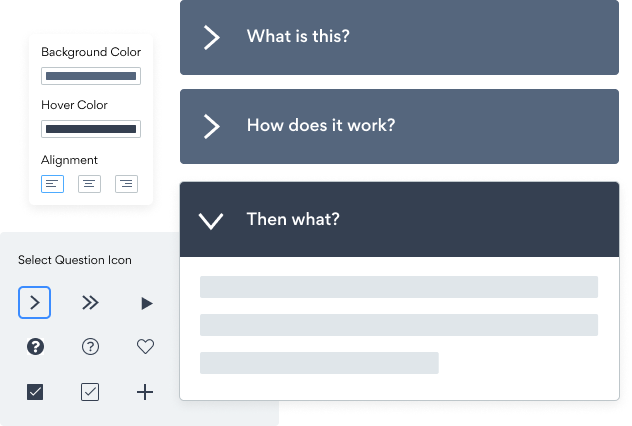

आपकी Coronavirus FAQ साइट पर Squarespace एंबेड करना कभी आसान नहीं रहा
अपनी अनुकूलित Coronavirus FAQ Squarespace एप्लिकेशन बनाएं, अपनी वेबसाइट की शैली और रंगों से मेल खाएं, और Coronavirus FAQ अपने Squarespace पृष्ठ, पोस्ट, साइडबार, फुटर, या जहाँ भी आप चाहें, पर जोड़ें साइट।
How To Add a Coronavirus FAQ App on Squarespace:
Create a Free Coronavirus FAQ App
Start for free nowEmbed POWR Coronavirus FAQ to your Squarespace
5. Copy and paste the Share App link ⬅. Adjust the embedded app, and click SAVE in the upper left corner. 1. Navigate to the Squarespace editor by clicking on the EDIT located in the upper left corner.- 1. Click on the blue Edit app icon seen above the app.
2. All edits in the opened POWR Editor will be automatically applied.
Need to know more about features and integrations of our Coronavirus FAQ app?
See the detailsRemove the Guesswork of Building Your Brand
Establishing Brand Identity 101 - Your Website
You've already invested time and resources in creating your business online just by having a Squarespace website.
Your work isn't done yet, though! Now it's time to attract and engage visitors, then make them into customers.


Make Your Website Elements Unique
Some may think only a 'techie' in the office or a self-proclaimed 'expert' on Facebook can develop a Coronavirus FAQ without a hitch.
Others look for low priced alternative Coronavirus FAQ apps from overseas or open source Coronavirus FAQ apps that claim to have what they're looking for.
POWR Saves You Valuable Time
Plus, updating and customizing a Coronavirus FAQ app can be challenging, and you may think you have to hire a developer.
Additionally, as your business increases, hackers could see an unsecured Coronavirus FAQ as a great opportunity to exploit your business and your customers. We consider this and built safeguards!
All POWR apps are built to scale with your business on Squarespace, so we offer the most advanced security features and high-volume capabilities on the market to keep your customers (and you) safe.

CASE STUDY: Rbia Shades wins big with POWR
Rbia Shades needed to expand beyond its region by bringing its products online. They needed a low-maintenance, non-techie solution.
After much research, they chose POWR as their no-code tool of choice.
In just a few short months of installing a POWR Popup app, Rbia earned over 600 new contacts – a 250% growth.
Next, they used a Social Feed app and quickly noticed a leap in new followers on Instagram and 200% more engagement on their site.
Last came the Media Slider. A beautiful way to show off their products and accessories to every site visitor the moment they land on their site.



Every POWR app works on any platform.
See apps in action

Trusted by the best in the biz!
POWR has helped over a half million businesses on every continent
(besides Antarctica, because of course not)


Frequently Asked Questions
Learn more about how to add POWR apps to your website.
Yes, any POWR app will work perfectly on any website. What’s better, is the patented POWR Live Editor is the same regardless of the app.
- Easily add more than one (for free)
- Edit to your needs directly from your live site
- Changes are made instantly
Absolutely! The POWR Coronavirus FAQ widget is optimized for mobile, ensuring that it looks great and functions smoothly across all devices, including phones and tablets.
This optimization enhances user experience, contributing to higher engagement rates on your Squarespace site.
POWR Coronavirus FAQ allows you to edit every detail such as fonts, colors, borders, and spacing directly from the editor, ensuring your Coronavirus FAQ perfectly match your brand's identity.
This flexibility makes it easy to integrate and align with your site's look and feel.
Adding Coronavirus FAQ to your Squarespace site is fully outlined above and straightforward with no coding required.
Simply follow POWR's setup guide, which is as easy as copy/pasting the provided code snippet into your site's HTML.
This ease of installation makes it convenient for Squarespace site owners to implement Coronavirus FAQ and gather feedback from their audience.
Using POWR Coronavirus FAQ on your Squarespace site offers numerous benefits, including enhanced customization options and easy installation without coding.
These features help improve your site's user engagement by allowing visitors to provide valuable feedback, leading to better online growth.